
Edgebander Not Starting? No Errors on Screen
Is your NikMann edgebander not starting even though the controller displays no error messages? Follow these basic troubleshooting checks to help identify the cause and determine your next step.
Request Installation Advice Call 1300 4 FORZAWhy Won't the Edgebander Start?
NikMann edgebanders use an integrated control system with a PLC (Programmable Logic Controller) and HMI (Human-Machine Interface). The controller normally displays alarms or warnings when a monitored fault is detected.
However, a machine may sometimes refuse to start without displaying an obvious error. A sensor signal, an unreleased emergency stop, an interrupted power supply or a safety interlock may prevent the startup sequence from completing.
If your machine is showing no errors, start with the external checks below. The exact location and function of sensors can vary by model and configuration, so consult the machine documentation if you are unsure.
What to Check When No Error Is Displayed
Work through these checks in order. Follow the manufacturer's operating instructions and do not bypass machine safety systems.
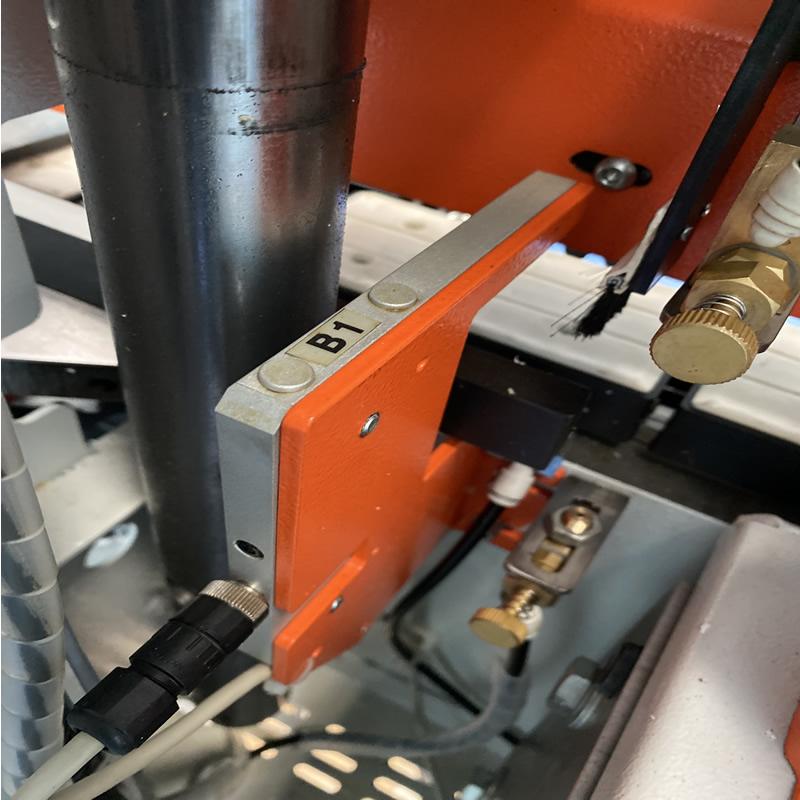
Check Sensor B1
On the NikMann models covered by this guide, sensor B1 is typically located near the glue pot on the left-hand side of the machine. Check your model's documentation to confirm its location.
If the sensor indicator light is ON, it may be detecting an obstruction or an incorrect sensor condition that prevents startup. Check the surrounding area for visible debris or obstruction.
Check the Sensor Indicator
After checking for visible obstructions, observe the sensor indicator from a safe position. The original troubleshooting guidance identifies the B1 indicator being OFF as an important startup check.
If the indicator remains ON, or the machine still will not start, do not adjust or reposition the sensor unless you are authorised and following the manufacturer's procedure.
Release Emergency Stops
Check that the emergency-stop buttons have been released according to the machine's operating instructions and that all required safety guards and interlocks are correctly in place.
Never bypass an emergency stop, guard or safety interlock to make the machine run.
Check the Power Supply
Check the machine's normal power indicators and confirm that the supply has not been interrupted and that no external circuit protection device has visibly tripped.
Do not open electrical cabinets or work on live electrical components. Electrical checks and resets should be carried out by a suitably qualified person.
Allow the Controller to Start
After switching on the machine using the normal operating procedure, allow the PLC and HMI to complete their startup sequence. Check whether the display responds normally.
If the controller appears frozen, remains blank or does not complete startup, contact technical support before attempting further resets.
Check Air and Safety Conditions
Confirm that the machine's required compressed-air supply is available and that the normal operating conditions specified in the manual have been met.
If the machine still does not start, a safety interlock, sensor signal or another control-system condition may require diagnosis by a qualified technician.
Why Sensor B1 Matters
Sensor B1 is the first checkpoint identified in this troubleshooting guide for applicable NikMann edgebanders. If its indicator light is ON, the control system may be receiving a signal that prevents the machine from starting.
Check for visible obstructions around the sensor without reaching into moving machinery. If inspection requires access to a hazardous area, isolate the machine using the manufacturer's lockout procedure and have the work completed by an appropriately trained person.
If the B1 indicator is OFF and the machine still will not start, further diagnosis may be required. Do not assume the sensor is the only possible cause.

No Allarm Errors on a Touch Screen
Chech the LED light on sensor B1. If the light is ON , clean up Top and Bottom part of sensor B1.

Clean Up sensor B1
Clean up TOP and BOTTOM FRONT parts of sensor B1. LED light should be OFF.
Light is OFF
If the LED light on sensor B1 is OFF , this means the sensor is in normal working order.
When Should You Contact Forza Machinery?
Contact our team if the basic checks do not resolve the issue, if the controller does not boot normally, or if a safety or electrical fault is suspected.
Machine Still Will Not Start
The B1 indicator is OFF, but the edgebander remains unable to start or complete its normal startup sequence.
Controller or HMI Problem
The display is blank, frozen or behaving abnormally, or the controller does not complete its startup process.
Repeated Startup Problems
The machine starts intermittently, stops unexpectedly or repeatedly fails to start despite normal external checks.
More Edgebander Troubleshooting Guides
Explore related technical articles for common NikMann edgebander alarms, operating problems and maintenance requirements.
Unitronic Controller Errors
Learn more about troubleshooting errors on older NikMann edgebanders fitted with Unitronic controllers.
Read troubleshooting guide →Alarm-04: Low Air Pressure
Understand the low compressed-air pressure warning and the checks required before returning the machine to service.
Read troubleshooting guide →Alarm-08: Rotary Photo Encoder
Find guidance relating to the rotary photo encoder D5 fault on applicable NikMann edgebanders.
Read troubleshooting guide →Alarm-09: Motor Coupling Overload
Review the related alarm information for a motor coupling overload condition.
Read troubleshooting guide →Alarm-12 Troubleshooting
Consult the dedicated Alarm-12 technical support article for additional information.
Read troubleshooting guide →Edgebander Service and Repairs
Find professional support for edgebander faults, maintenance requirements and machine repair enquiries.
Explore edgebander repairs →Keep Your Woodworking Machines Running
Forza Machinery provides woodworking machinery sales, technical assistance and service support for businesses in Melbourne, Victoria and across Australia.