How to Change the Temperature on an Edgebander Glue Pot
Learn how to check and adjust the glue-pot temperature on your edgebander. Correct temperature is important for adhesive application, bonding strength and overall edge-banding quality. This guide explains the general adjustment process and what to check if the glue is too hot or too cold.
Request Technical Support Call 1300 4 FORZACommon Glue-Pot Temperature Problems
Before adjusting the temperature, identify the symptoms and confirm that the adhesive and machine settings are suitable for the application.
Glue Temperature Too Low
Adhesive that is not hot enough may have poor flow, uneven application or insufficient wetting of the panel and edging. This can contribute to weak bonding or visible glue lines.
Check: The displayed temperature, adhesive specifications, heating status and whether the glue has reached its operating temperature.
Glue Temperature Too High
Excessive heat may cause adhesive discolouration, degradation, smoke or changes in bonding performance. Prolonged exposure to excessive temperature can damage the adhesive.
Check: The temperature setting and maximum permitted temperature specified by the adhesive manufacturer.
Temperature Fluctuations
If the displayed temperature changes unexpectedly or does not stabilise, the cause may be related to the temperature sensor, heating element, controller or electrical connections.
Check: Whether the display reaches the set temperature and remains reasonably stable during operation.
Glue Not Melting Correctly
Adhesive that remains solid or melts unevenly may indicate insufficient heating, incorrect adhesive, an unsuitable setting or a problem with the heating system.
Check: The adhesive type, machine compatibility and the manufacturer's recommended operating procedure.
Incorrect Adhesive Selection
EVA and PUR hot-melt adhesives have different processing requirements. Using the wrong temperature for the adhesive can affect application and bonding quality.
Check: The adhesive packaging and technical data sheet before changing any machine setting.
Glue-Pot Alarm or Heating Fault
If the glue pot does not heat, overheats or displays an alarm, the problem may be electrical or related to the temperature control system rather than the selected setting.
Check: The alarm message and machine manual. Do not bypass safety devices or continue operating with an unresolved heating fault.
Identify Your Glue-Pot Controller
The temperature adjustment procedure varies between edgebander models and controllers. Identify the control system before changing any settings.
Digital Temperature Display
Some machines use a dedicated digital temperature controller with a display and adjustment buttons. The set temperature and actual temperature may be shown separately.
PLC or Touchscreen Control
Other edgebanders allow temperature settings to be changed through the main operator interface. The setting may be located in a heating, glue-pot or machine-parameters menu.
Older Controller Systems
Older machines may use a separate controller or a different menu structure. Follow the instructions for the exact controller installed on your machine.
Confirm the Adhesive Type
Identify whether the machine is using EVA or PUR adhesive and confirm that the glue pot is designed for that adhesive system before adjusting the temperature.
How to Change the Glue-Pot Temperature
Use the following general procedure as a guide. The actual buttons, menus and confirmation steps depend on your edgebander and temperature controller.
Check the Recommended Temperature
Read the adhesive manufacturer's technical data sheet and confirm the recommended application temperature. Do not choose a setting based only on the glue's appearance.
Locate the Temperature Setting
On a dedicated controller, identify the set-temperature function. On a touchscreen machine, locate the relevant heating or glue-pot settings menu using the machine manual.
Adjust the Set Temperature
Use the controller's specified adjustment method to enter the required temperature. Change the setting only as needed to match the adhesive manufacturer's recommendations.
Confirm and Save the Setting
Follow the controller's instructions to confirm or save the new value. Some systems apply the setting immediately, while others require a confirmation step.
Allow the Glue to Reach Temperature
Allow sufficient time for the glue pot and adhesive to reach the required operating temperature. Check the actual temperature display where available.
Test the Bonding Result
Once the machine is ready, process a suitable test panel using the approved operating procedure. Check adhesive application, edge adhesion and the finished glue line.
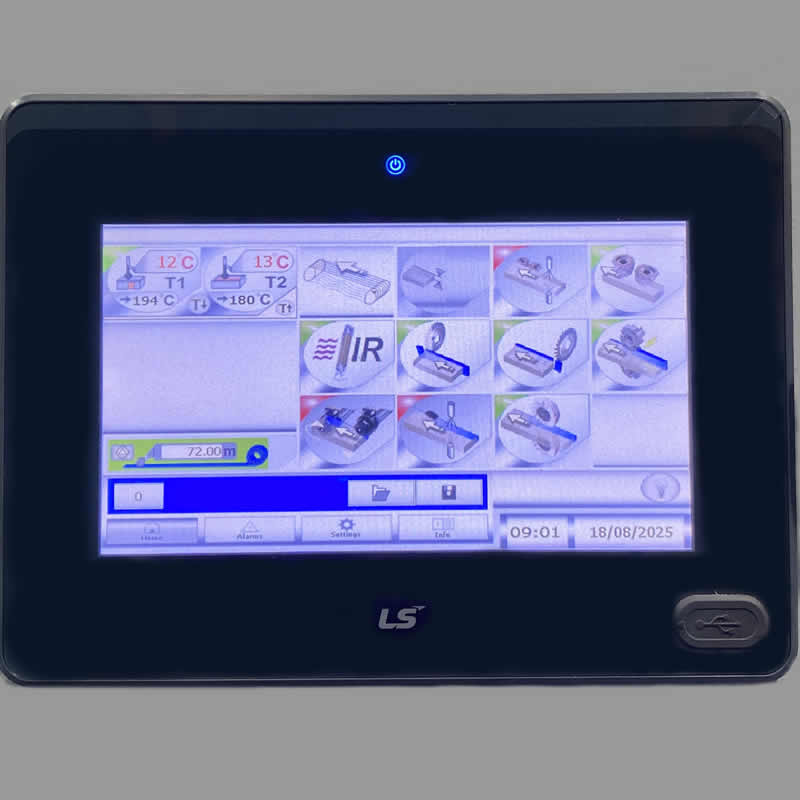
Touch Screen Controller
- ✅ Temperature Control: Set and monitor the glue pot temperature to match EVA or PUR adhesives;
- ✅ Unit Activation/Deactivation: Easily switch on or off specific units such as pre-milling, gluing, end trimming, top/bottom trimming, scraping, and buffing;
- ✅ Speed Adjustment: Control the feed speed to suit different materials and production requirements;
- ✅ Diagnostics & Alerts: Monitor machine status, view error codes, and receive alerts for maintenance or troubleshooting;
- ✅ Safety & Lock Functions: Built-in protections prevent unauthorised access and ensure operator safety.
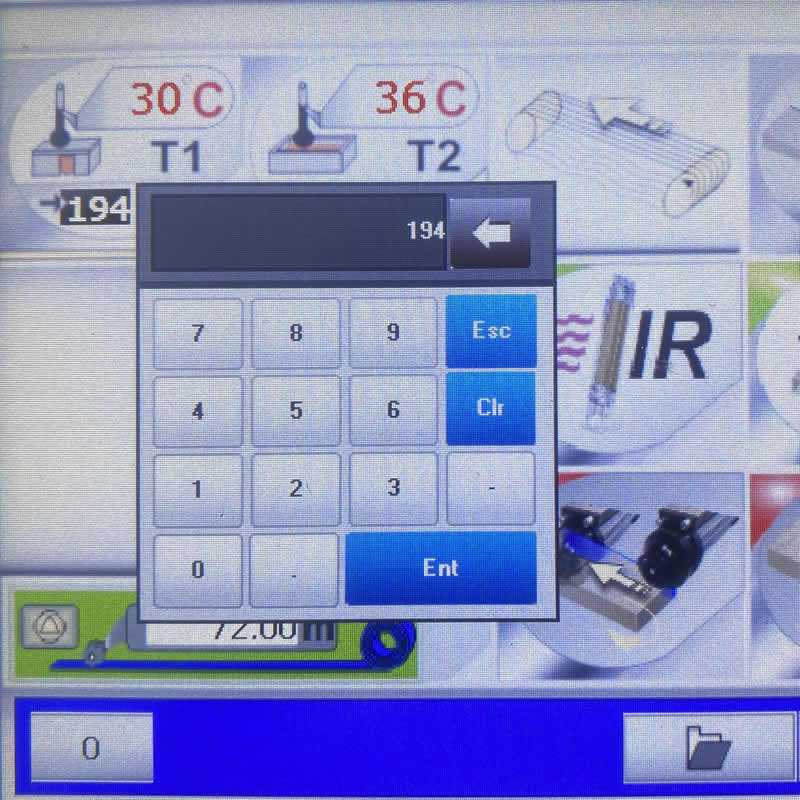
Adjusting the Glue Roller Temperature:
- ✅ Access the Control Panel: On your NikMann edgebander, locate the temperature control on the operator’s panel or touchscreen (depending on the model);
- ✅ Check the Current Setting: The display will show the current glue pot temperature;
- ✅ Adjust the Temperature: Input the desired value and press ENTER;
- ✅ Wait for Stabilisation: The machine will begin heating up or cooling down. Allow a few minutes for the glue pot to reach the new set temperature before resuming operation;
- ✅ Follow Manufacturer’s Guidelines: Always set the temperature according to the adhesive manufacturer’s recommendations (typically 180–200°C for EVA glue and 120–140°C for PUR glue) to ensure proper bonding without burning or damaging the glue.
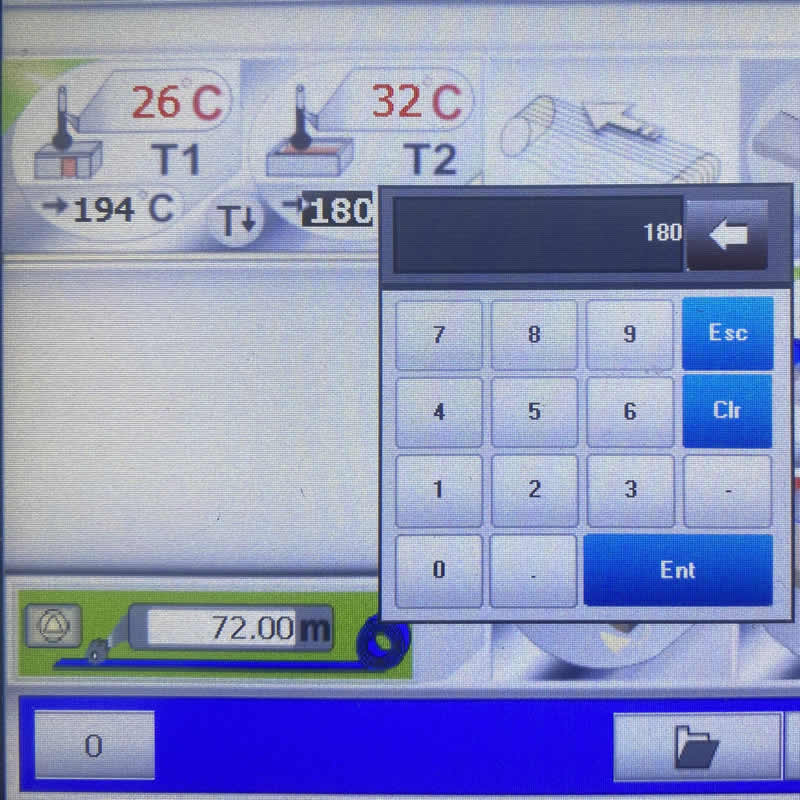
Adjusting the Glue Pot Temperature:
- ✅ Access the Control Panel: Locate the temperature settings on the operator’s panel or touchscreen (depending on your NikMann edgebander model);
- ✅ Verify Current Setting: The display will indicate the current glue roller temperature;
- ✅ Set the Desired Temperature: Enter the required value and confirm by pressing ENTER;
- ✅ Allow Stabilisation: The machine will heat or cool accordingly. Wait a few minutes until the glue pot reaches the new temperature before continuing operation;
- ✅ Follow Manufacturer Guidelines: Always set the temperature according to the adhesive specifications: typically 180–200°C for EVA glue and 120–140°C for PUR glue. This ensures proper bonding without overheating or damaging the glue.
What Temperature Should the Glue Pot Be Set To?
There is no single correct temperature for every edgebander. The adhesive specification and machine design determine the appropriate setting.
EVA Hot-Melt Adhesive
Some EVA adhesives used in edge banding operate in the approximate range of 180–200°C. The correct temperature depends on the particular product, application method and manufacturer's instructions.
Important: Use the temperature range specified for your adhesive rather than assuming all EVA products use the same setting.
PUR Hot-Melt Adhesive
Some PUR adhesives are processed at lower temperatures, with approximately 120–140°C being an example for certain products. Requirements vary, so the adhesive data sheet must determine the actual setting.
Important: PUR systems may require specialised moisture control, sealed glue-pot arrangements and specific cleaning procedures.
Check the Machine Specification
Confirm the permitted temperature range of the installed glue pot and controller. Never exceed the machine's specified operating limits.
Allow for Application Conditions
Feed speed, adhesive application, panel material and ambient conditions may affect bonding performance. Follow the adhesive manufacturer's guidance when assessing these factors.
Glue-Pot Temperature Troubleshooting
If changing the temperature does not resolve the problem, use these checks to identify the next step.
The Temperature Will Not Increase
Confirm that the heating system is enabled and check whether the controller displays an alarm. If the set temperature is not reached, the heating element, sensor, power supply or control circuit may require inspection by a qualified technician.
The Temperature Is Too High
Stop and assess the condition in accordance with the machine's operating instructions. Verify the setpoint and controller reading. If the temperature remains excessive, follow the manufacturer's shutdown procedure and arrange technical inspection.
The Glue Line Is Too Thick or Uneven
Temperature is only one possible cause. Check the adhesive specification, glue application system, roller condition, feed settings and panel preparation before changing multiple machine parameters.
The Adhesive Has Discoloured
Discolouration may indicate overheating, prolonged heating or adhesive contamination. Follow the adhesive supplier's instructions for handling and replacement, and inspect the heating controls if overheating is suspected.
Important Safety Information
Glue pots contain hot adhesive that can cause serious burns. Keep hands and tools away from hot glue and moving machine components. Use the required personal protective equipment and follow the edgebander manufacturer's safety procedures.
Before inspecting electrical components or servicing the heating system, stop and isolate the machine according to the prescribed procedure. Do not remove guards, bypass safety devices or work on live electrical components.
PUR adhesives can react with moisture. Follow the adhesive supplier's instructions for storage, handling, cleaning and shutdown, and use only a glue-pot system approved for the adhesive.
Need Help Changing Your Glue-Pot Temperature?
If you cannot locate the temperature setting, the controller does not respond, the temperature fluctuates or the glue pot fails to heat correctly, the machine may require further diagnosis.
Forza Machinery provides woodworking machinery service and technical support for businesses in Melbourne, Victoria and across Australia.
Edgebander Repairs
Get assistance with edgebander operating problems, glue-pot heating faults and other machine issues.
Edgebander Repairs →Technical Support
Explore additional troubleshooting information for woodworking machinery and edgebander operation.
Technical Support →Contact Forza Machinery
Tell us your edgebander brand and model, controller type, adhesive type and the temperature problem you are experiencing.
Call: 1300 4 FORZA →
Get the Best from Your Edgebander
Correct glue-pot temperature helps support reliable bonding, consistent adhesive application and a quality finished edge. Follow the adhesive and machine manufacturer's instructions, and contact Forza Machinery if you need technical assistance.