NikMann Edgebander ALARM-02: Motor Overheating
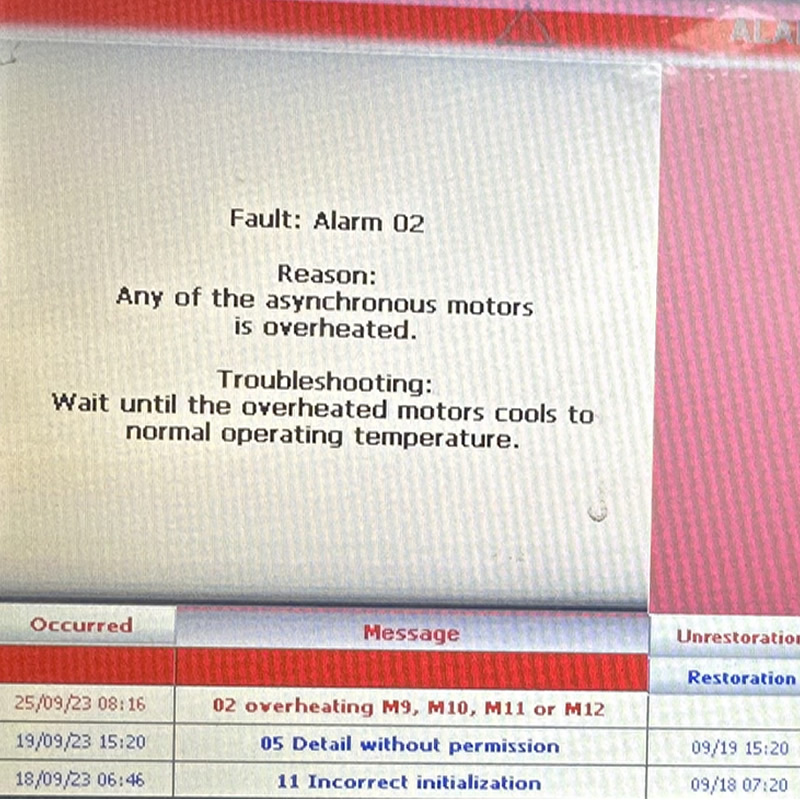
Is your NikMann edgebander displaying ALARM-02? This alarm indicates that an asynchronous motor has overheated or that its thermal protection system has detected an over-temperature condition. Follow this troubleshooting guide to understand the possible causes, check the machine safely and determine when professional service is required.
Request Service Call 1300 4 FORZAWhat Does NikMann ALARM-02 Mean?
ALARM-02 indicates that an asynchronous motor has overheated. These motors drive processing units on the edgebander, such as pre-milling, glue application, end trimming, corner rounding or buffing, depending on the machine configuration.
The motor protection system is designed to help prevent damage caused by excessive temperature. Overheating may result from excessive mechanical load, restricted cooling, prolonged operation or an electrical or motor fault.
Important: The alarm identifies an overheating condition; it does not necessarily mean the motor itself has failed. Identify the affected motor and investigate the cause before returning the machine to production.
Excessive Motor Load
A motor working under excessive load can generate more heat than it can dissipate. This may happen when a driven unit encounters abnormal resistance or operates outside its intended conditions.
Check: Note which machine function was operating when the alarm appeared and look for signs of unusual resistance.
Restricted Cooling
Dust buildup, blocked ventilation openings or a cooling fan problem may reduce heat dissipation and contribute to motor overheating.
Check: Inspect accessible ventilation openings and cooling arrangements according to the machine maintenance instructions.
Mechanical Resistance
A binding component, worn bearing, damaged part or accumulated debris can increase the load on the motor.
Check: Look for visible obstructions or signs of mechanical damage after the machine has been safely stopped and isolated where required.
Dust or Glue Buildup
Production debris or hardened adhesive may interfere with the movement of relevant machine components, depending on the processing unit affected.
Check: Inspect accessible areas and clean the machine using the manufacturer's approved procedures.
Extended Operation
Continuous operation under demanding conditions, inadequate maintenance or unsuitable operating conditions may contribute to excessive motor temperature.
Check: Review when the alarm occurs and whether it appears after the machine has been running for an extended period.
Electrical or Motor Fault
An electrical supply issue, damaged motor or fault within the motor control system may cause abnormal heating or trigger protective shutdown.
Check: If overheating recurs or the motor behaves abnormally, arrange qualified electrical and motor diagnosis.
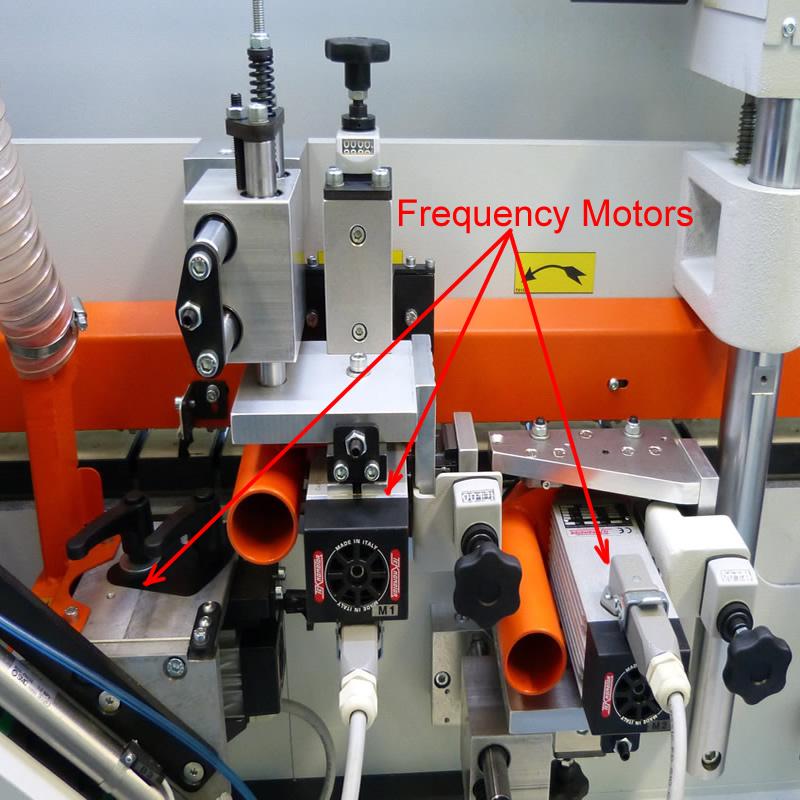
Some of the HF motors are overheated.
Check if any of the HF motors are very hot.
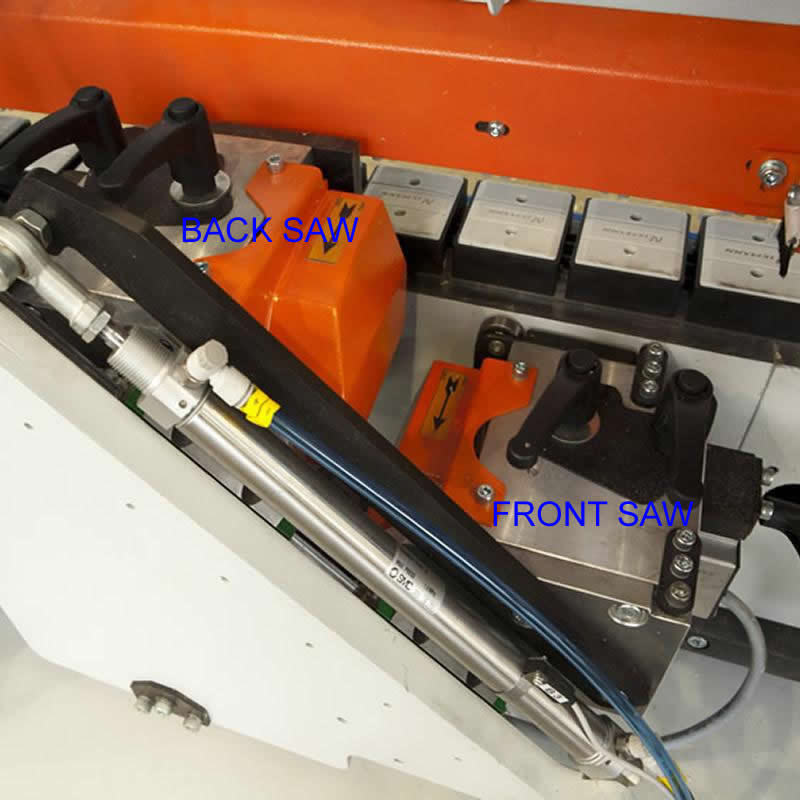
Some of the Front or Back END SAW motors are overheated.
Check if any of the END SAW motors are hot and not turning. Clean Up blades.
Some of the FINE TRIMMING motors are overheated.
Check if any of the FINE TRIMMING motors are hot and not turning. Clean Up blades.
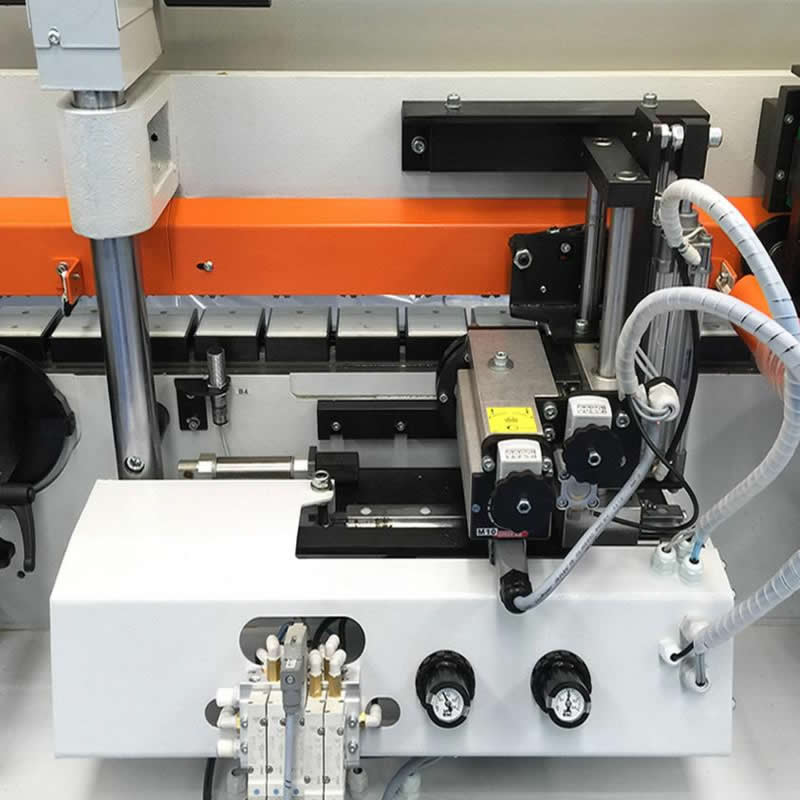
Some of the CORNER ROUNDER motor is overheated.
Check if any of the CORNER ROUNDER motor is hot and not turning. Clean Up blades.
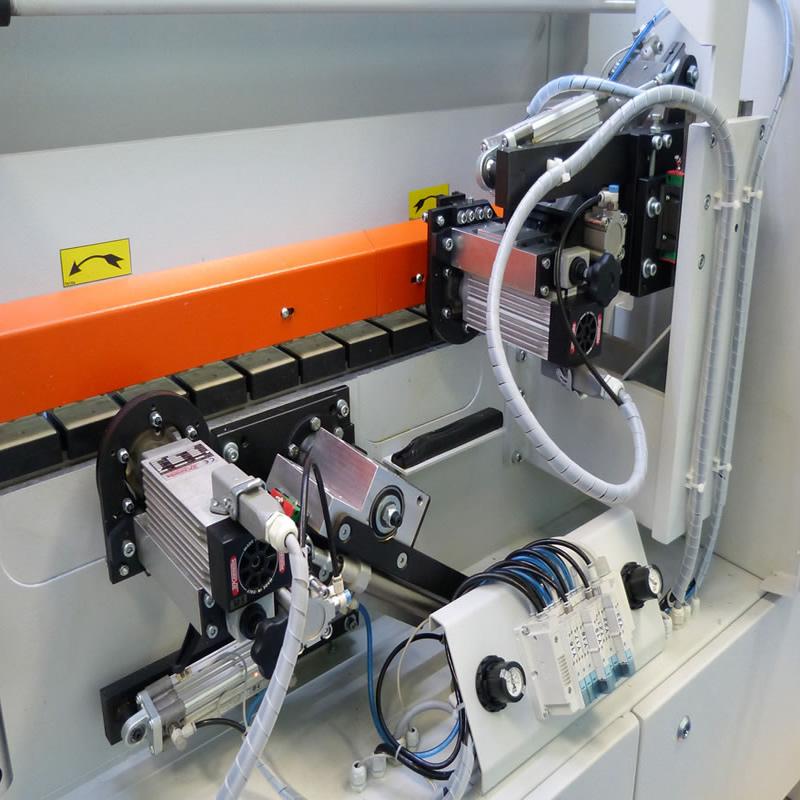
Some of the CORNER ROUNDER motors are overheated.
Check if any of the CORNER ROUNDER motors are hot and not turning. Clean Up blades.
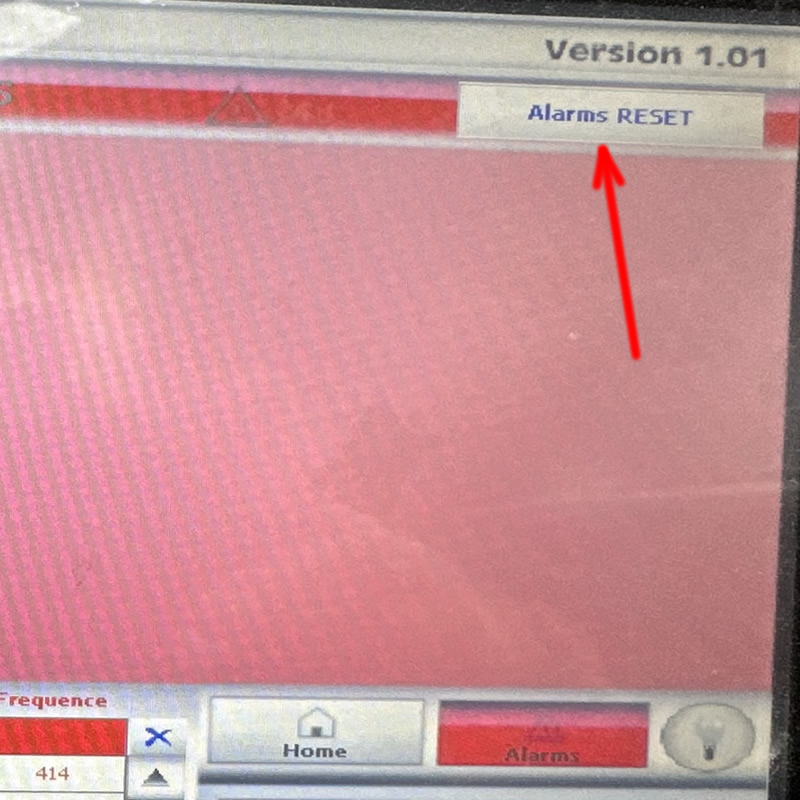
Reset ALARMS by pressing the button on a screen.
If your machine still have a problem , please call : 1300 4 FORZA
Record the Alarm and Identify the Motor
Before resetting the machine, collect the available information to help narrow down the cause.
Record the Exact Message
Note ALARM-02 and any additional message displayed on the HMI. Take a photograph of the screen if possible.
Identify the Processing Unit
Note whether the alarm appeared during pre-milling, glue application, trimming, corner rounding, buffing or another operation.
Note When the Alarm Occurs
Record whether the alarm appears immediately at startup, during a particular operation or after the machine has been running for some time.
Check for Other Symptoms
Note unusual noise, vibration, reduced performance, a burning smell or other alarms. Do not continue operating a machine that appears unsafe.
Stop the Machine and Allow the Motor to Cool
Allowing the motor to cool is important, but cooling alone does not resolve the underlying cause of the alarm.
Stop the Machine Safely
Follow the machine's shutdown procedure. Isolate the equipment according to the manufacturer's instructions before carrying out inspections that require access to hazardous areas.
Allow Sufficient Cooling Time
Allow the affected motor to cool naturally for the period required by the manufacturer and the operating conditions. Do not assume a fixed cooling time is suitable for every motor.
Inspect Accessible Ventilation Areas
Once the machine is safe to inspect, look for visible dust buildup or blocked ventilation openings that may restrict cooling.
Do Not Repeatedly Reset the Alarm
Repeated resets without investigating the cause may allow an underlying fault to continue. If the alarm returns, stop and arrange further diagnosis.
Check for Mechanical Resistance
If a driven component is binding or overloaded, the motor may overheat again after restarting. Inspection must follow the machine's safety and isolation procedures.
Inspect for Obstructions
Look for visible debris or material buildup around the affected unit. Never reach into a machine while it is operating or coasting to a stop.
Check the Driven Components
Depending on the affected unit, inspect for signs of wear or damage around applicable cutters, belts, pulleys, bearings or other driven components.
Look for Unusual Wear
Excessive vibration, unusual noise or repeated overheating may indicate a developing mechanical problem that needs professional inspection.
Do Not Force Components
If a component appears jammed, damaged or difficult to move, do not force it. Arrange inspection and repair before returning the machine to service.
Check the Cooling and Electrical Systems
If the machine appears mechanically sound but ALARM-02 persists or returns, further diagnosis may be required.
Cooling Fan and Ventilation
Check accessible cooling arrangements in accordance with the machine manual. A failed fan or blocked airflow may contribute to overheating.
Electrical Supply
An unsuitable or unstable supply may contribute to motor operating problems. Electrical measurements and supply checks must be performed by a qualified person.
Motor and Protection Circuit
A qualified technician may need to inspect the motor, temperature protection system, wiring and associated control components to identify the source of the fault.
Check for Recurring Alarms
If the alarm appears again after the motor has cooled, do not continue restarting the machine. Record the symptoms and arrange professional diagnosis.
How to Help Prevent Motor Overheating
Regular maintenance can help identify conditions that contribute to motor overload and unexpected downtime.
Keep the Machine Clean
Remove dust and production debris according to the approved cleaning procedure. Keep accessible ventilation openings clear.
Maintain Mechanical Components
Follow the maintenance schedule for applicable bearings, belts, pulleys and other driven components. Investigate unusual noise or resistance promptly.
Monitor Machine Performance
Watch for repeated alarms, vibration, unusual sounds or reduced performance. Do not ignore changes in the machine's normal operating behaviour.
Arrange Regular Servicing
Preventative maintenance can help identify developing mechanical, electrical and cooling problems before they interrupt production.
More NikMann Edgebander Troubleshooting
Explore related technical support resources or contact Forza Machinery if your machine continues to display an alarm.
Unitronic / Unitronics Errors
Learn about PLC alarm messages and general troubleshooting for NikMann edgebanders.
View PLC Error Guide →ALARM-01: Motor Overheating
Read about the separate ALARM-02 condition associated with an overheated asynchronous motor.
View Alarm-01 Guide →Edgebander Repairs
Get assistance with machine faults, diagnostics, servicing and repairs.
Edgebander Repairs →Keep Your NikMann Edgebander Operating Reliably
Investigating motor overheating promptly can help protect machine components, reduce unplanned downtime and improve production reliability. If ALARM-02 persists or returns, contact Forza Machinery for technical support.