NikMann Edgebander Alarm-01: Motor Overheat Protection
Is your NikMann edgebander displaying ALARM-01? This alarm indicates that the motor PTC temperature protection circuit has detected an over-temperature condition. Learn what the alarm means, what to check safely and when to contact Forza Machinery for technical support.
Request Service Call 1300 4 FORZAWhat Does NikMann ALARM-01 Mean?
ALARM-01 is associated with the motor PTC overheat protection system. PTC stands for Positive Temperature Coefficient. A PTC temperature sensor changes its electrical resistance as the motor temperature rises. The machine control system monitors this signal and can stop operation when an over-temperature condition is detected.
Depending on the machine configuration, the affected motor may operate a processing unit such as pre-milling, glue application, end trimming, corner rounding or buffing. The exact motor must be identified before troubleshooting.
Important: ALARM-01 does not automatically mean that the motor has failed. Excessive mechanical load, restricted cooling, a sensor problem or an electrical fault may also need to be investigated.
Motor Overheating
A motor may become too hot after sustained operation, excessive loading or operation outside its intended duty conditions.
Check: Allow the motor to cool according to the machine manufacturer's instructions and investigate why the temperature increased.
Mechanical Overload
Excessive resistance in the driven unit can place additional load on the motor. Possible causes include restricted movement, accumulated debris or a component that is binding.
Check: Look for visible obstructions and signs of mechanical resistance with the machine safely stopped and isolated as required.
Dust or Glue Buildup
Accumulated dust, adhesive residue or debris around machine components can interfere with movement or ventilation, depending on the affected unit.
Check: Inspect accessible areas and carry out routine cleaning in accordance with the machine manual.
Restricted Cooling
Blocked air inlets, dirty cooling passages or a faulty cooling fan may prevent a motor from dissipating heat correctly.
Check: Inspect accessible ventilation openings and cooling arrangements. Do not operate the machine with required guards or covers removed.
Electrical Supply or Motor Fault
Electrical supply problems, damaged wiring or an internal motor fault may contribute to abnormal heating or a temperature protection alarm.
Check: Record when the alarm occurs and arrange qualified electrical diagnosis if a supply, wiring or motor fault is suspected.
PTC Sensor or Wiring Fault
A damaged temperature sensor, loose connection or wiring fault may prevent the control system from receiving a reliable motor-temperature signal.
Check: If the alarm persists after the motor has cooled, have the sensor circuit and associated wiring checked by a qualified technician.
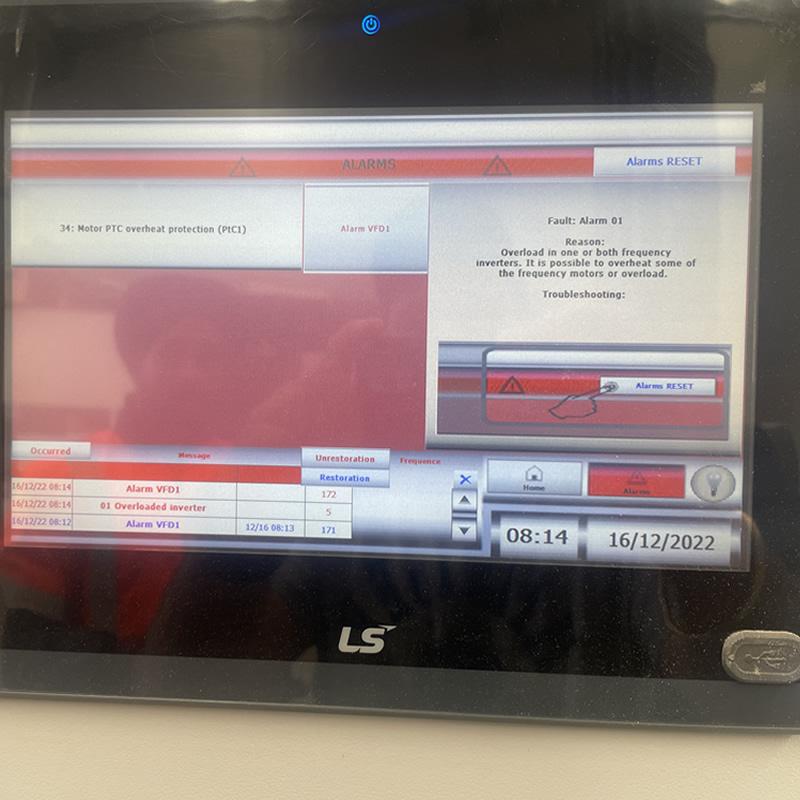
Alarm-1 | Motor PTC overheat protection
Overload in one or more frequency inverters. It is possible to overheat some of the frequency motors or overloads.
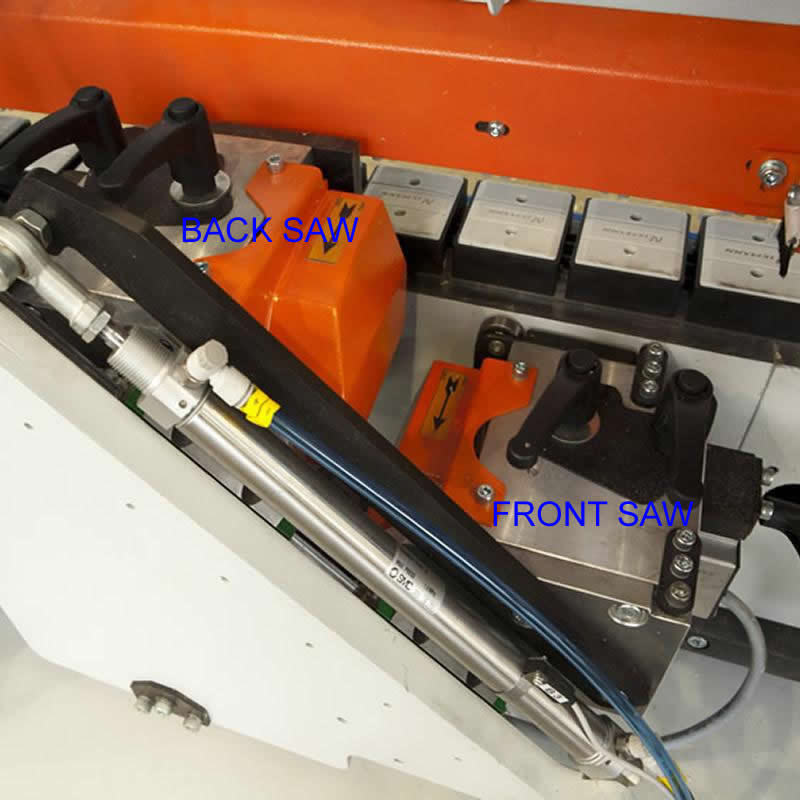
Some of the Front or Back END SAW motors are overheated.
Check if any of the END SAW motors are hot and not turning. Clean Up blades.
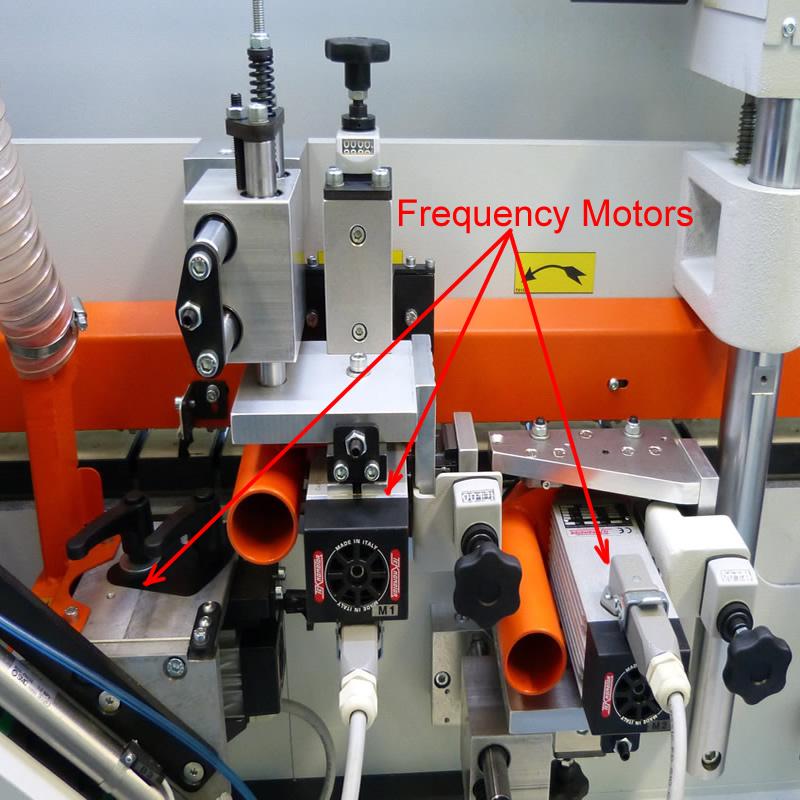
Some of the FINE TRIMMING motors are overheated.
Clean Up machine's frequency motors and check them for free rotation. If one of them not rotating , please call 1300 4 Forza.
Record the Alarm and Identify the Affected Motor
Start by collecting information from the machine controller. This helps narrow down the fault and avoids replacing components unnecessarily.
Record the Exact Alarm
Note ALARM-01 and any additional message displayed on the HMI. Take a photograph of the screen if practical.
Check the Alarm History
If the controller provides an alarm history or diagnostic screen, use the operator manual to locate information about the affected motor or machine unit.
Note When It Occurs
Record whether the alarm appears at startup, after the machine has been running, or when a particular processing unit is activated.
Check for Other Symptoms
Note any unusual noise, vibration, reduced performance, overheating or other alarms. Do not continue operating if the machine appears unsafe.
Allow the Motor to Cool
If the motor has genuinely overheated, it must cool before the machine can be safely assessed for normal operation.
Stop the Machine Safely
Follow the machine's normal shutdown procedure. If an abnormal condition is present, keep the machine out of service until it has been assessed.
Allow Sufficient Cooling Time
Allow the affected motor to cool in accordance with the manufacturer's instructions. Cooling time varies with the motor, operating conditions and severity of overheating.
Check the Surrounding Area
Once the machine is safely isolated where required, inspect accessible ventilation openings and look for obvious dust buildup or restricted airflow.
Do Not Force a Restart
Do not repeatedly reset the alarm or restart a hot motor without identifying the likely cause. Repeated overheating can damage the motor and related components.
Check for Mechanical Resistance
A motor may overheat when the unit it drives encounters excessive resistance. Inspection should be carried out only after the machine has been made safe.
Inspect for Obstructions
Look for visible debris or material buildup around the affected processing unit. Follow the manufacturer's isolation and access procedures before inspection.
Check the Driven Unit
Depending on the motor involved, the affected unit may include milling, trimming, corner rounding, glue application or buffing components.
Look for Signs of Wear
Unusual noise, vibration or recurring resistance may indicate worn bearings, damaged components or another mechanical problem requiring professional inspection.
Arrange Repairs if Needed
If a component appears jammed, damaged or difficult to move, do not force it. Arrange inspection and repair before returning the machine to production.
Reset ALARM-01 After the Cause Is Addressed
Resetting the alarm should be the final step after the underlying condition has been checked and corrected.
Confirm the Machine Is Safe
Ensure the inspection is complete, required guards are fitted and all personnel are clear of hazardous areas.
Follow the Machine Manual
Use the approved reset procedure for your NikMann model and controller. The reset sequence may vary between machine configurations.
Monitor the Machine
If the alarm clears, follow the normal startup procedure and monitor the machine for abnormal sounds, overheating or a returning fault.
Stop if the Alarm Returns
If ALARM-01 reappears, stop troubleshooting by reset alone. The motor, PTC sensor circuit or associated machine system may need further diagnosis.
How to Help Prevent Motor Overheat Alarms
Regular inspection and maintenance can help identify conditions that may contribute to motor overheating.
Keep the Machine Clean
Remove dust and production debris using the approved cleaning procedure. Pay attention to accessible ventilation areas and processing units.
Maintain Moving Components
Follow the maintenance schedule for bearings, belts, chains and other applicable mechanical components. Correct maintenance requirements depend on the unit.
Monitor Operating Conditions
Watch for unusual sounds, vibration, reduced performance or repeated alarms. Investigate changes rather than allowing the machine to continue under abnormal load.
Schedule Regular Servicing
Preventative servicing can help identify developing mechanical, electrical and cooling problems before they cause unexpected production interruptions.
More NikMann Edgebander Troubleshooting
Explore related technical support resources or contact Forza Machinery if your machine continues to display an alarm.
Unitronic / Unitronics Errors
Learn about PLC alarm messages and general troubleshooting for NikMann edgebanders.
View PLC Error Guide →ALARM-02: Motor Overheating
Read about the separate ALARM-02 condition associated with an overheated asynchronous motor.
View Alarm-02 Guide →Edgebander Repairs
Get assistance with machine faults, diagnostics, servicing and repairs.
Edgebander Repairs →Keep Your NikMann Edgebander Running Reliably
Motor protection alarms should be investigated before production resumes. Identifying the cause can help prevent repeat faults, protect machine components and reduce unplanned downtime.