Edgebanders for Sale Australia-Wide
⚠️ ALARM-08
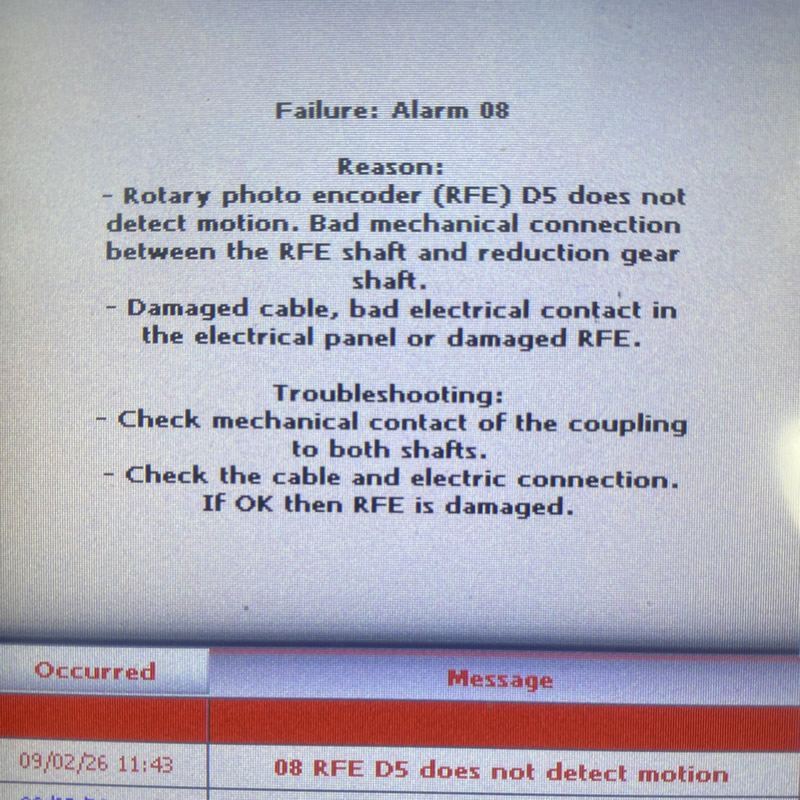
Rotary Photo Encoder D5 Fault. There is no motion on a feed track or a faulty encoder.
Request a Quote Call 1300 4 FORZARotary Photo Encoder D5 Does Not Detect Motion on a feed track.
Alarm-08 on a NikMann edgebander indicates that the rotary photo encoder D5 is not detecting motion. This alarm prevents the machine from operating safely, as the control system cannot confirm conveyor or panel movement.
When Alarm-08 appears, the edgebander may stop feeding panels, disable machining units, or fail to start entirely.
🔍 What Does ALARM-08 Mean?
Alarm-08 is triggered when the PLC does not receive a movement signal from the D5 rotary photo encoder within the expected time.
The encoder is responsible for:
Monitoring conveyor belt movement;
Synchronising feed speed;
Bad ellectrical contact in electrical cabinet;
Timing trimming, corner rounding, scraping, and buffing>;
Ensuring safe machine operation;
Without encoder feedback, the machine cannot operate correctly.
📞 Call Forza Machinery today to book your edgebander for service in Melbourne.
📍 Servicing Melbourne, Victoria & Australia-wide support
🔧 Preventative maintenance & emergency repairs available
Common Symptoms When Alarm-08 Appears
If your NikMann edgebander shows Alarm-08, you may notice:
❌ Conveyor belt not moving
❌ Panel feed stops immediately after start
❌ Trimming or corner rounding units not engaging
❌ Machine stops during operation
❌ Inconsistent or incomplete edging
This fault commonly affects NikMann PUR edgebanders and compact edgebanders in high-dust environments.
Main Causes of Alarm-08 (D5 Encoder Not Detecting Motion)
1. Dust or Glue Build-Up
Glue residue or wood dust can block the optical sensor, preventing signal detection.
2. Encoder Wheel Slipping or Worn
Loss of contact between the encoder wheel and conveyor drive can stop motion detection.
3. Incorrect Encoder Alignment
If the D5 encoder is mounted incorrectly or too far from the contact surface, it will not register movement.
4. Loose Cables or Damaged Wiring
Vibration during operation can loosen plugs or damage the encoder cable.
5. Faulty Rotary Photo Encoder D5
After extended use, the encoder itself may fail and require replacement.
How to Clear Alarm-08 on a NikMann Edgebander
✔ Clean the rotary encoder and sensor lens
✔ Check encoder alignment and pressure
✔ Inspect cables, plugs, and terminals
✔ Confirm encoder signal input at the PLC
✔ Replace the D5 rotary photo encoder if faulty
⚠️ Incorrect adjustment may cause repeated alarms or further damage — professional servicing is strongly recommended.
NikMann Edgebander Alarm-08 Repair & Service in Australia
Forza Machinery provides expert NikMann edgebander repair and diagnostics, including:
Alarm-08 fault diagnosis
Rotary photo encoder D5 replacement
Conveyor speed and feed calibration
PLC and electrical fault repairs
Preventive maintenance servicing
We support cabinet makers and joinery workshops across Melbourne and Australia.
Need Help Clearing Alarm-08?
If your NikMann edgebander shows Alarm-08 – rotary photo encoder D5 does not detect motion, avoid unnecessary downtime.
👉 Contact Forza Machinery for fast technical support
👉 Genuine spare parts available
👉 Trusted woodworking machinery specialists
RELATED TECHNICAL SUPPORT ISSUES:
⚠️ Unitronic Errors on NikMann Edgebanders
⚠️ Alarm-01 | Motor PTC overheat protection
⚠️ Alarm-02 on NikMann edgebanders
⚠️ Alarm-04 | Air pressure too low
⚠️ Alarm-08 | Rotary Photo Encoder D5 Fault
⚠️ Alarm-09 on NikMann edgebanders
⚠️ Alarm-12 on NikMann edgebanders
⚠️ Corner Rounder issues on Nikmann-RTF edgebander
⚠️ Edgebander removing melamine around hinge holes
⚠️ Edgebander chipping side of the panel
⚠️ Glue Pot Repair & Rebuild Services
⚠️ How to change the temperature on edgebanders glue pot
⚠️ Digital counter for panel thickness different from analog one.
⚠️ Why Edge Banders are important?
⚠️ Edgebander Glue Pot Service Melbourne
⚠️ Extra tape on back of the panel
⚠️ Teflon glue tank with electronic regulation
⚠️ How to adjust the Glue Scrapers on NikMann edgebanders
⚠️ No errors on a screen | Edgebander not working
⚠️ Adjustment on Digital readout on panel saw